Friday, April 24, 2009

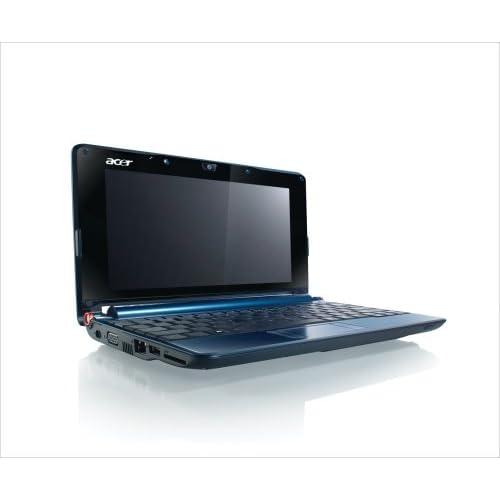
Acer Aspire One Sapphire Blue


A great choice for business travelers who like to travel light as well as those who need extra-long battery life, this affordable ultra-lightweight Acer Aspire One (LU.S050B.133) weighs just over 2 pounds and is packed with a 160 GB hard drive and Windows XP operating system. It has a vibrant 8.9-inch CrystalBrite WSVGA LED backlit display, integrated webcam for easy video chatting, an instant-on feature that powers up the notebook in less than 15 seconds from when you switch it on, and Intel's latest mobile processor--the Atom. Offering a cool deep blue hue, the netbook's smooth surface is comfortable to touch, and it's accented with distinctive details, such as the attractive orange hinge ring.
Designed especially for mobile devices, the 1.6 GHz Intel Atom processor uses a brand new design structure new hafnium-infused circuitry--which reduces electrical current leakage in transistors--to conserve energy, giving you more time away from the wall outlet--up to 5.5 hours with the included 6-cell battery. Other features include 1 GB of installed RAM (1.5 GB maximum), 54g Wi-Fi networking (802.11b/g), multi-format memory card reader, multiple USB ports, and built-in email, web browsing, and digital media applications.

It comes preinstalled with the Microsoft Windows XP Home operating system, which offers more experienced users an enhanced and innovative experience that incorporates Windows Live features like Windows Live Messenger for instant messaging and Windows Live Mail for consolidated email accounts on your desktop.

Wednesday, April 22, 2009

Laptop Bag

Role of laptop bag is very important to protect our laptop device that is not cheap price.

Select a laptop bag that has features to protect your laptop safe from the impact, scratches, and others that can cause your laptop is broken.
To have features in a laptop bag should be designed and innovative use of materials, material selection is not cheap price. Do not buy any laptop bag for cheap price.

In general, the bag is equipped with various laptop compartment to store various equipment such as mobile phones, cable, business cards, stationery, etc. Adjust your needs daily.

Laptops have a variety of sizes different. Make sure you choose a laptop bag that can accommodate the size of your laptop.

There are various models such as laptop bags backpack, shoulder and tri function. Choose according to taste, habits, or your needs. People who daily use the motorcycle as a means of transportation, it is usually more convenient to use a backpack type digendong in the back.

If you choose a laptop bag backpack model, see the attached systems back on your back. Bag laptop backpack that has a good water flow system that allows air flow into and out through the midst of back system, so that your back does not feel hot even if you put in a long time.

If you choose the laptop bag shoulder strap system which has long attributed to you in the shoulder, make sure you have a laptop bag shoulder pad is thick and can be moved, move the brow so that you do not feel sick at the time to bring a laptop.

Choose a laptop bag that provides long-term warranty repair, so that your investment will be a laptop bag has a value of safe use for a long time.

High quality laptop bags that have a value in the market re-sale, during the condition is still good and worthy life. To maintain the condition of your laptop bag in a prime situation, choose the material is strong, not easily worn-out and dull, and a trusted brand.

Caring for Laptop Batteries

Battery laptop is an interesting topic discussed, and the people who ask how the battery lasting and durable. Many of the outstanding information and also a lot of misunderstanding. Some things about the laptop battery:

1. Ability notebook battery will decrease over time if you use them or not. In general, notebook battery will last between one to three years.

2. Low temperatures will slow the process of discharge (loss of power when in use without connecting to electrical power) of the elements in the battery. Conversely, high temperatures will shorten the battery ages. Leaving the battery installed when you connect with the electrical power will cause the temperature inside the battery increases. Remove the battery and store in the cold temperature will slow the damage process. Leaving the notebook in a hot environment is also not good for the battery.

3. Lithium-Ion batteries used in notebook is designed to be used about 300-800 times the cycle charge / discharge. Some of this cycle is used when you leave the battery connected when using notebook power electric power. At the time connected to the electric power, notebook akan routinely remove the battery when it has reached level penge-specific charge-an (example: 95%). Disconnecting the battery and store it in a dry place and protect some of the cold akan cycle.

4. Li-Ion Battery is not affected by memory effects (the battery needs to be up at all before filled again to avoid a decrease in capacity of) such as the rechargeable battery outdated. Repetition cycle-life to fill out will increase the capacity loss per cycle. Several times' content sharing some 'better than a one-time' wear out '. However, you also have to batteries mengkalibrasi regularly.


How to extend battery ages

1. With battery calibration 'wear out' every 30 times to maintain the accuracy of the elements in the battery. Use your notebook until the battery runs out-of-charged before.
2. Avoid repetition 'wear out' the order. Li-Ion battery a bit more storage capacity lost when one has not been charged out use.
3. Release baterau and store in a cool and dry. Is the optimum level of 40% for long storage. Save the battery power is low will cause permanent damage. Therefore, it is usually when you buy a new notebook, the battery is fully up to about half a quarter.
4. If you store batteries in the refrigerator, use plastic bags a sealed to avoid humidity. Leave the battery menghangat at room temperature before use or menge charge it.

Some practical tips:

1. Avoid to put your battery is a hot place, such as in the car at the time of day
2. Use until exhausted is not good for Li-Ion battery. Should do when your back is to reach 10-20% level.
3. Battery calibration every 30 times you charge. Leave the battery taken out, to keep a laptop in the remains accurate.
4. If you will be using electric power for long periods, you can extend the age of the battery and remove it with a saving in storage
5. Save at the dry and cold conditions with the battery than 40%. Some experts suggest that to save it in the refrigerator. Use a plastic bag that is closed meeting to remove the moisture.
6. Do not enter into the freezer to be frozen.
7. If you want to use again, leave at room temperature before used again.

Tips Choosing a Laptop

Technology in the era when this laptop is not likely to become a luxury again. Laptops become loyal friend for those activities, the laptop always accompany each work they and wherever they go. Although many consumers are confused when you want to buy a new laptop because the laptop is not cheap goods. There appear at this time various types of laptop with various specifications and brand, the price varies. Not infrequently the consumer to buy a laptop with a good specification uses without thinking.
Here are some tips about choosing a laptop according to the needs:
Processor
Intel vs. AMD?
A lot of debate about the second company. But actually the second company this is the best processor in the world and race each other to develop the type of processor best. Currently Intel processors for notebook, have better technology to save battery. But most users will not encounter any difficulty prosesornya brand. Because there was no difference in performance between the two light. Notebooks with AMD processors are usually much cheaper price.

Intel Mobile Processor technology, latest
• Pentium M (Dothan) - Used in noteboook manufactured around 2004. This technology is made specifically for use in notebook and power needs to operate with a smaller and more cold than the preceding.
• Celeron M (Dothan and Yonah) - single-core processor (one core) is cheap, according to the most basic applications, such as office and graphics. But not able to support applications that are heavy.
• Core Solo (Yonah) - Processors cheap structure made from the Core Duo, but only has 1 CPU core active. Core Solo replaces the Pentium M in 2006.
• Core Duo (Yonah) - dual-core technology (two core) of Intel. Core Duo (32-bit) to create 2 on 1 CPU without increasing the processor power consumption.
• Core 2 Duo (Merom) - 64-bit version of the Core Duo, performance slightly better than Core Duo and can run Windows Vista and 64-bit applications other.

AMD's latest mobile processors
• Sempron - Processor 1 core low in the old notebook. As a replacement of the Athlon. The latest version supports 64-bit applications.
• Turion 64 - Processor 1 core, 64-bit with a power consumption that is lower than the Sempron
• Turion 64 x2 - Dual Core version, from the 64-bit Turion

GPU
Nvidia vs. ATI?
This debate is a topic that is also popular. They both produce a good graphics card. Nvidia better in OpenGL technology and support Linux. Meanwhile, ATI has better ability in the game, anti-aliasing and anisotropic filtering. There are no differences between them be.

Most important you know how big the program needs to use your graphics card. If you use a 3D application or game that weight, you will need a VGA with a dedicated high performance. If not, VGA Intel GMA 900/950 that is more than enough

RAM
Of all the components in the notebook, the amount of RAM installed will have the most obvious effect. The large RAM, faster applications will run. Currently, the minimum is 512MB, and is recommended you have a 1GB, especially if you're running Windows Vista. If you run multiple applications simultaneously (multitasking), you need to consider to upgrade to 2GB.
There is no different between 533MHz and 667MHz.
RAM is also one of the most prominent component in the upgrade, you can even do it yourself.

Hard Drive
How much storage capacity you need? Do you plan to store lots of files, music, video or photos? If so, you need Harddisk capacity is greater. But if you have limited funds, buy external hard drive will be cheaper and can be an option.

Optical Drive
Currently, almost all laptops are equipped with a DVD writer, which can also function as a CD writer, DVD reader and CD reader.

Wireless
When all this laptop is also equipped with wireless technology. Most of the notebook is equipped with Intel PROSET 3945 802.11 a / b / g Wireless card.

Battery
If you plan to frequently use your laptop without the charger cable to the drive power, you need enough battery capacity. Currently, the average notebook battery is able to survive about 2-3 hours.
Tips How To prevent battery Laptop / Notebook durable

Caring for laptop / notebook can not be careless, required accuracy and diligence. So that the laptop / notebook with you to work well, note these tips below:

1. Avoid using the laptop battery and charger that is not compatible.
Contact customer service from the manufacturer of the laptop to make sure the battery is compatible.

2. Do not get the laptop on the thigh, lay on the carpet, and on the mattress. It will obstruct the flow of air at the bottom of the notebook and can cause overheating as the surface of carpet / mattress soft.
So that air circulation is not running perfectly.

3. Avoid the crush and impact of (avoid putting heavy burden on the laptop)
This will cause the circuit in the battery's going to be vulnerable short-circuit short (korslet) that cause overheating.

4. Do not put a laptop in any place, especially in places exposed to direct sun sengatan such as under a window or in a car in the parking lot in the field.

5. Avoid contact of the battery holder with a loose objects made of metal.

6. Avoid liquid spillage from a laptop on it because it will dry up even later and return to its normal function, but the circuit in the laptop or the battery will slowly but surely erode.

7. Do not forget to treat the laptop and the battery in accordance with the instructions listed in the manual, which is always them.

"Magical Template" designed by Blogger Buster